In the world of digital marketing, speed is key.
Whether you’re a small business owner, a marketing professional or just starting out with online marketing there’s always something you can do to boost your online presence.
But it’s easy to get overwhelmed by the sheer amount of strategies, tools and platforms out there.
That’s why focusing on small, doable tasks that can be done in one day is the way to keep momentum without feeling overwhelmed.
In this post we’ll look at 8 specific digital marketing tasks you can do today. These tasks are designed to be big impact and doable, so you can get quick wins to support your long term success.
Let’s get started!
1. Optimise Your Social Media Profiles
Social media profiles are the digital face of your brand. They’re often the first point of contact between your business and potential customers so it’s important they’re polished, professional and reflect your brand’s identity.
But what does it mean to “optimise” a social media profile and how do you do it?
Profile Picture and Cover Image
Your profile picture is the first visual element users will see so it needs to be recognisable. For businesses this means using a high quality image of your logo.
If you’re a personal brand consider a professional headshot. Make sure the image is clear, not pixelated and looks good even when scaled down to a thumbnail.
The cover image is an opportunity to say more about your brand or current campaigns. It could be your latest product, a special offer or simply the ethos of your business.
Make sure it’s well designed, matches your brand colours and is updated regularly to keep things fresh. 
Bio and Description
Your bio or description section is the perfect place to make a strong first impression.
This is where you should clearly state what your brand is about and what value you offer to your audience.
Use relevant keywords that are in your industry so your profile shows up in search results within the platform and on search engines.
Keep your tone consistent with your brand’s voice – whether that’s formal, friendly or quirky. And don’t forget to include a call to action (CTA) that tells visitors what to do next, such as visit your website or sign up to your newsletter. 
Contact Info
Make sure your contact info is up to date and complete. This includes your website, email address and any other relevant links (such as an online store or additional social media profiles).
For businesses with physical locations, address details are critical for local SEO and so customers can find you.

Consistency Across Platforms
If you’re on multiple social media platforms, consistency is key. Use the same profile picture, handle and general bio structure across all platforms.
This reinforces brand recognition and makes it easier for users to find and connect with you on different channels.
Action Step: Spend 30 minutes today reviewing and updating your social media profiles. Make sure everything is up to date, images are high quality and the overall look aligns with your brand.
2. Audit Your Website’s SEO
Search Engine Optimisation (SEO) is the practice of optimising your website to rank higher on search engine results pages (SERPs) so potential customers can find you.
A quick SEO audit will reveal the issues and opportunities. It sounds scary when you hear all this jargon but discovering your site’s SEO is easier than you think.
You can do it yourself, especially with the free tools.
On-Page SEO Elements
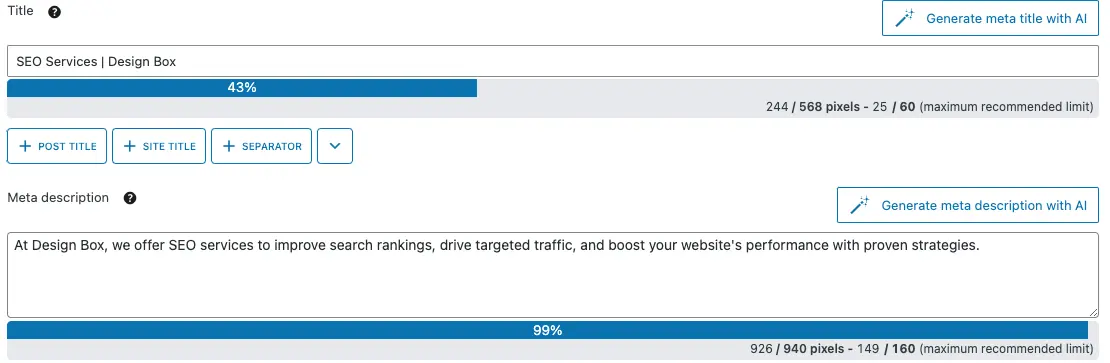
Start with the basics of on-page SEO: title tags, meta descriptions, header tags (H1, H2, etc.) and keyword usage.
These are the foundation because they help search engines understand the content and relevance of your pages.
-
- Title Tags: Each page on your website should have a unique and descriptive title tag that includes relevant keywords. The title should be short, ideally under 60 characters and clearly state what the page is about.
-
- Meta Descriptions: Meta descriptions should be around 150-160 characters long and summarise the page’s content. Include a keyword but write for the reader as this will often determine whether they click through from the search results.
-
- Header Tags: Use header tags (H1, H2, etc.) to structure your content. The H1 tag should be the main topic of the page, H2 and H3 tags can be used to break up subtopics. This makes your content more readable and helps things like Google and Bing understand the hierarchy of your content.
Keyword Usage and Content Quality
Check your keyword usage on site. Are you targeting the keywords your audience is searching for?
Avoid keyword stuffing which can get penalised by search engines. Instead aim for natural keyword integration that enhances the user experience.
In addition to keywords, focus on the overall quality of your content. Is it informative, engaging and valuable to your audience?
High quality content that answers the needs and interests of your visitors will rank better and attract backlinks which further boosts SEO. 
The example above is targeting the keyword ‘candidate attraction‘ and has also been deemed quality content by Google as the purple highlighted text indicates that it has been used as a featured snippet on Google.
Technical SEO
Technical SEO is about optimising the backend of your website. A full technical audit will take more time but you can quickly check a few key elements today:
Page Speed: Use Google PageSpeed Insights to check your website’s loading speed. A fast website improves user experience and can help with SEO rankings.
Mobile-Friendliness: Make sure your website is mobile friendly by using responsive design. More users are accessing the web on mobile devices so search engines favour mobile friendly sites in their rankings.
Broken Links: Check for broken links on your website as these can cause a poor user experience and negatively impact your SEO. Use tools like Screaming Frog or Ahrefs to find and fix broken links.
Action Step: Do a basic SEO audit using free tools like Google Search Console, Yoast SEO (for WordPress users) or an online SEO checker. Focus on optimising one or two pages today, maybe your homepage or a high traffic blog post.

3. Create and Schedule Social Media Posts
Consistency is key with social media marketing. Regular posting helps with visibility, engagement and brand awareness. But creating and posting daily can be time consuming.
That’s where scheduling comes in.
Content
Start by thinking of content ideas that align with your brand’s goals and audience interests. Content types can be:
-
- Promotional Posts: Promote your products, services or special offers. Use eye catching visuals and compelling CTAs to drive conversions.
-
- Educational Content: Share tips, how-tos and industry insights that provide value to your audience. This will position your brand as an authority in your niche.
-
- Engagement Posts: Create content that encourages interaction, like polls, questions or user generated content campaigns.
Once you have your ideas, create the content. This could mean designing graphics, writing captions or even recording short videos. Tools like Canva are great for quick and easy posts.

Above we can see an example from Breaking Ballet, where 3 different posts have been pinned to combine one eye-catching post that promotes a free guide.
Scheduling Content
After you’ve created your content, use a social media management tool like Buffer, Hootsuite or the native scheduling tools on Facebook and Instagram to schedule your posts.
These tools will help you plan and organise your content calendar so you don’t have to be online every day.
When scheduling consider the best times to post for your audience. Research shows different platforms have different peak engagement times.
For example, Instagram might see more engagement in the evenings, LinkedIn might perform better during weekdays.
Action Step: Spend 1-2 hours today creating and scheduling social media posts for the week. Mix up the content types to keep your audience engaged.
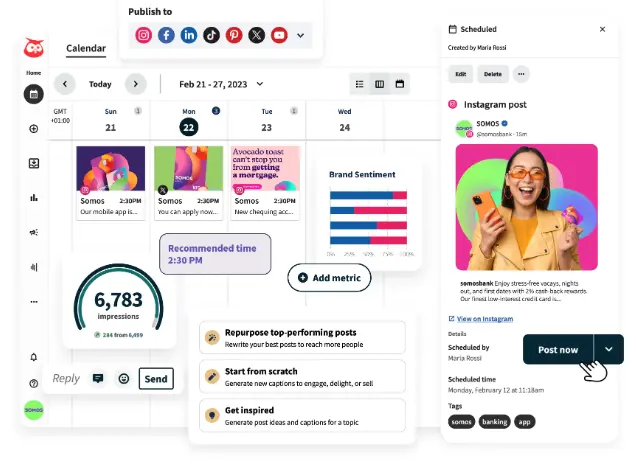
Source: Hootsuite
Above is an example of the interface for Hootsuite, where you can see many options are provided for scheduling, posting and reviewing content.
4. Send a Quick Email Campaign
Email marketing is a powerful way to stay in touch with your audience, drive traffic to your website and increase conversions.
Whether you’re promoting a new product, sharing a blog post or providing valuable tips, email campaigns can be a great way to reach your audience directly.
Objective
Before you start writing your email define your objective.
Are you promoting a product, announcing a sale, sharing content or just staying top of mind with your subscribers?
Knowing your objective will help you write a more targeted and effective email.
Start with a great subject line that grabs attention. The subject line is the first thing your recipients will see so make it interesting and relevant to get opens.
For example, if you’re promoting a sale you could use something like “Exclusive 24 Hour Sale – Don’t Miss Out!”
The body of your email should be simple and to the point. Use short paragraphs, bullet points and images to make it look good and easy to read.
Personalise where you can—using the recipient’s name for example can increase opens.
Include a clear call-to-action (CTA) that tells the recipient what to do next, whether it’s visit your website, buy, or sign up to an event. Make the CTA stand out by using a button or bold text. 

The example above shows an email campaign by The Sunshine Co. to promote a sale that they had in August 2024.
As you can see, there is an attention grabbing subject line, as well as clear CTAs, personalisation and reinforcement of the special offer throughout.
Segmentation and Personalisation
If you have a segmented email list, segment your message to different audience segments.
For example, you might send one version of the email to existing customers with a loyalty discount and another version to new subscribers with a first time purchase incentive.
Segmentation and personalisation makes your emails more relevant and gets higher opens, click-throughs and conversions.
Email Marketing Tools
Email marketing tools like Mailchimp, Constant Contact or Brevo make it easy to design, send and track your emails.
These tools have customisable templates, audience segmentation options and analytics to measure your email performance.
Action Step: Send a targeted email today. Even a simple email to check in with your subscribers will keep you top of mind and drive engagement.
5. Engage with Your Online Community
Engagement is key to building a loyal online community. Just posting content isn’t enough, you need to actively interact with your audience to build relationships and encourage continued participation.
Reply to Comments and Messages
Start by going through your recent social media posts and reply to any comments or messages.
Acknowledge the good stuff, answer the questions and address the concerns quickly. This shows you value your audience’s input and builds trust and credibility.
Personalised responses are better than generic ones. For example if someone compliments your product, thank them specifically and ask how they’re using it or what they like most about it.
This opens the door to further conversation and deeper engagement. 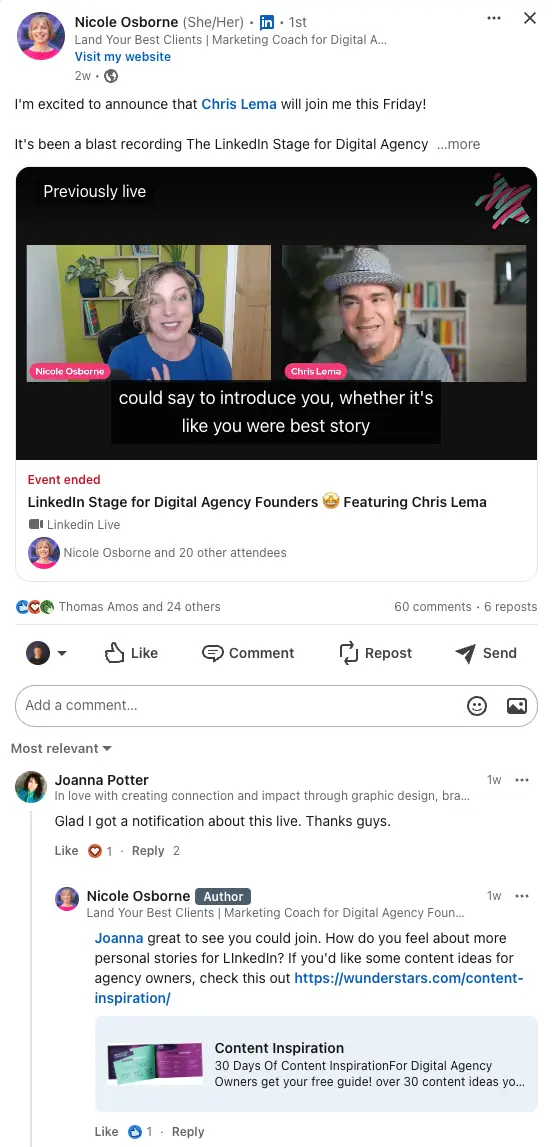
As you can see above, Nicole from Wunderstars made a post that already generated a lot of engagement, but then notice her response to comments below. This is a great example of trying to generate further engagement on the post.
Join Relevant Online Conversations
Beyond your own social media pages, look for opportunities to join relevant online conversations.
This could be industry specific forums, LinkedIn groups or even the comments section of blogs and articles related to your niche.
By sharing your expertise and answering questions you position yourself as an expert in your industry.
By joining these conversations you can drive traffic back to your own social media profiles or website.
User-Generated Content
Encouraging your audience to create and share content around your brand is a great way to increase engagement.
This could be as simple as asking customers to post a photo of themselves using your product with a specific hashtag.
User generated content gives you fresh content to share and builds a sense of community with your audience.
Run a contest or giveaway that encourages user generated content. For example, ask followers to share their best tip using your product, with a prize for the best submission. This increases engagement and visibility of your brand.
Action Step: Spend 30 minutes today engaging with your online community. Reply to comments, join relevant conversations and find ways to encourage user generated content. 
Source: Meltwater
As seen in the above example, ASOS took advantage of people on Instagram using their #OOTD hashtag, which stands for Outfit Of The Day.
Their campaign, #AsSeenOnMe was designed to promote individuals wearing ASOS clothing, and thus further promoting themself.
6. Update Your Google Business Profile
A Google Business Profile (GBP) is essential for any business with a physical location or service area.
It helps you show up in local search results, provides customers with important information and can influence their decision to choose your business over a competitor.
Verify and Complete
Start by making sure all the information on your Google Business Profile is accurate and up to date.
This includes your business name, address, phone number, website and business hours. Inaccurate information will lead to missed opportunities and frustrated customers.
If your business hours change seasonally or for special occasions make sure these are updated on your profile.
Google allows you to set special hours which can be really useful during holidays or special events.

Add Photos and Videos
Visual content attracts customers. High quality photos of your business, products and services will make your profile more attractive and give potential customers a better idea of what to expect.
Consider adding a short video tour of your business or a behind the scenes look at your operations.
Video content is super engaging and will make your profile stand out in search results. 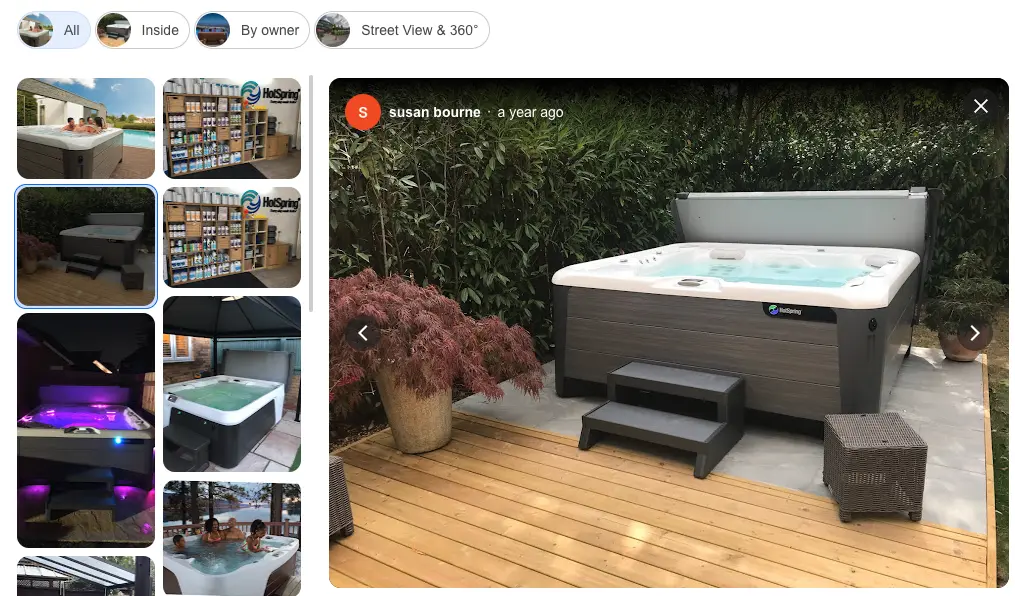
Manage and Respond to Reviews
Positive Reviews
Reviews are a key part of your Google Business Profile.
Positive reviews will increase your visibility in search results and influence potential customers.
Ask happy customers to leave a review by sending a follow up email or including it in your transactional communications. 
Negative Reviews
Just as important is how you handle negative reviews.
Respond quickly and professionally, address the customer’s issue and offer to fix it. This shows you value customer feedback and are committed to great service. 
Google Posts
Google allows you to create posts that appear on your Google Business Profile. These can be used to share updates, promotions, events or blog content.
They’re a great way to keep your profile fresh and give potential customers information.
Action Step: Spend 30 minutes today updating your Google Business Profile. Verify all information, add new photos or videos and consider creating a Google Post to promote a current offer or event. 
7. Competitor Analysis
Competitor analysis is a key part of any digital marketing strategy.
By knowing what your competitors are doing well (and where they’re failing) you can find opportunities to differentiate your brand and improve your marketing.
Who Are Your Competitors?
Start by identifying your competitors. These are the businesses that offer similar products or services and target the same audience as you. Competitors can be direct (offering the same products) or indirect (offering alternative solutions).
Look at Their Online Presence
Take a deep dive into your competitors’ websites, social media profiles, content and SEO. Key areas to focus on:
-
- Website Design and User Experience: How does their website look? Is it easy to use? Does it load fast? A good website design can make a big impact on user experience and conversion rates.
-
- Content Strategy: What type of content are they producing? How often are they publishing new content? Look at their blog, videos, infographics and social media posts. Analyse the topics they cover and how they engage with their audience.
-
- SEO: Use tools like SEMrush, Ahrefs or Moz to analyse your competitors’ SEO. What keywords are they targeting? How strong is their backlink profile? Knowing their SEO approach will help you find gaps in your own strategy.
-
- Social Media: Look at how your competitors engage with their audience on social media. What type of posts get the most engagement? Are they running social media ads? Knowing their approach will help you refine your own social media strategy.
Opportunities
Based on your analysis, find opportunities to differentiate your brand or improve your marketing.
For example, if a competitor has a strong presence on Instagram but is weak on LinkedIn you might focus more on LinkedIn to go after that segment of the market.
Also look for content gaps your competitors aren’t covering. If you see they haven’t covered certain topics relevant to your audience, create content around those topics to fill the gap.
Action Step: Spend 1-2 hours today doing competitor analysis. Use what you learn to refine your own digital marketing and find new growth opportunities.
8. Plan Your Next Content
Content is the core of digital marketing. It drives traffic, engages your audience and can help you become an authority in your industry.
Plan your next piece of content today so you stay on top of your content marketing and keep giving value to your audience.
Topic
Start by brainstorming topics that are relevant to your audience and your brand goals. Think about what questions your customers ask, what challenges they face or what’s currently trending in your industry.
Keyword research can also help you find topics that are in demand.
Tools like Google Keyword Planner, Ahrefs or SEMrush will show you what keywords your audience is searching for so you can choose a topic that will attract traffic.

Content Outline
Once you have your topic, create an outline for your content. This will help you structure your thoughts and make sure your content is easy to follow.
Your outline should include:
- Introduction: Introduce the topic and why it’s relevant to your audience.
- Main Points: Break the topic down into key points or sections. Each point should be backed by research, examples or case studies.
- Conclusion: Summarise the main points and include a clear call-to-action (CTA) e.g. visit your website, subscribe to your newsletter or share on social media.
Content Type
Choose the format of your content. Will it be a blog post, video, infographic, podcast or something else? The format should match your audience’s preferences and the content itself.
For example, a complex topic might be better explained in a long form blog post or video, a list of tips might work well as an infographic. 
Source: Visme
Content Promotion
Think about how you will promote and distribute your content once it’s published. Will you share it on social media, include it in an email campaign or optimise it for search engines?
A solid distribution plan will get your content in front of the most people.
Action Step: Spend 1-2 hours today planning your next piece of content. Create an outline, decide on the format and start drafting if you have time. Having a plan in place will make the content creation process easier and faster.
Get Started Today
Digital marketing is a process and consistency is key.
By doing these 8 tasks today you’ll make big progress in your online presence and position your brand for long term growth.
Remember the digital landscape is always changing so you must stay proactive and adapt to new trends and opportunities as they come.
Whatever you’re doing – optimising your social media profiles, auditing your website’s SEO or planning your next piece of content – it all adds up to a better digital marketing strategy.
So get to it today and see the results in traffic, engagement and conversions.
If you need help with your digital marketing or lack the time to execute some of the tasks mentioned in this post, get in touch with the team at Design Box to see how we can help boost your business’ online presence.
Digital Marketing Services