Are you struggling to convert your WooCommerce store’s visitors into buyers? You’re not alone. In fact, a study by Adobe found that 38% of shoppers will leave a website if they find the layout unattractive. That means your WooCommerce store’s design can make or break your sales.
Designing a high-converting WooCommerce store is about more than just looks; it involves applying proven conversion rate optimisation (CRO) techniques to create a seamless shopping experience that turns visitors into loyal customers.
The difference between a basic store that exists and one that consistently converts comes down to effective WooCommerce store design and user experience (UX).
In this blog, we’ll cover the core building blocks of a high-converting WooCommerce store, a simple step-by-step setup process, and the key design features that can turn casual browsers into loyal customers.
Essentials You Need Before Building Your Store
Before you start building your WooCommerce store, make sure you have the right foundations in place. This includes:
- Choose a fast, mobile-friendly WooCommerce theme that works well on all devices.
- Install essential plug-ins like Yoast SEO for optimisation and WooCommerce Payments to accept Stripe and PayPal.
- Use high-quality product photos to build trust and showcase your products.
- Maintain clear and consistent branding for a professional and memorable store appearance.
- Add an SSL certificate to keep your customer data safe and build trust.
- Make your store policies (return, shipping, privacy) easy to find and understand.
- Display genuine customer reviews to provide social proof and boost buyer confidence.
Step-by-step: How to Build a WooCommerce Store that Converts
Building a WooCommerce store that drives sales doesn’t have to be complicated. By focusing on the right setup, user experience and conversion rate optimisation (CRO) best practices, you can create an online shop that makes buying easy and enjoyable for your customers.
1. Set up the foundation
Start by installing WooCommerce on your WordPress site and configuring the basic settings. This includes adding payment gateways like Stripe and PayPal to offer secure payment options. It’s also important to choose a WooCommerce-friendly theme that is clean, simple, mobile-responsive and optimised for fast loading speeds.
2. Stock your digital shelves
Next, add your products with clear, detailed descriptions that highlight key features and benefits. Organise your products into easy-to-navigate categories and add relevant tags to help shoppers find what they need quickly. Include professional photos and videos from multiple angles to help build trust and help customers make confident purchase decisions.
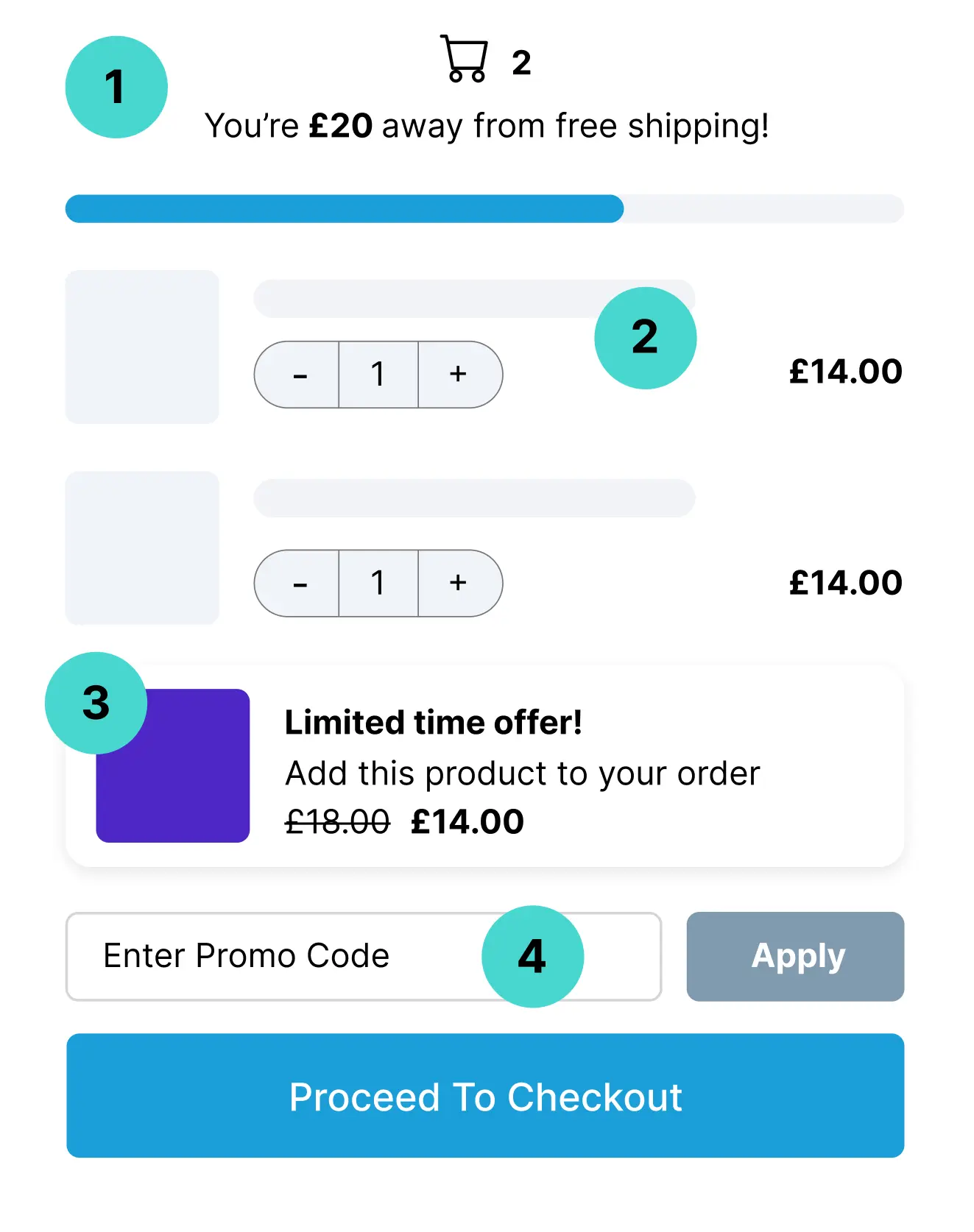
3. Create a simple checkout process
Must-Have Elements for a High-Converting Product Page
Turning visitors into customers starts with optimised product pages. These must-have elements should be included on every WooCommerce product page:
- High-resolution photos and videos: Show your product from every angle. Clear, detailed visuals help customers trust what they are buying.
- Real customer reviews: Nothing beats honest feedback. Show reviews to build confidence and answer common questions before they are even asked.
- Clear ‘Add to Cart’ buttons: A crucial CRO element, these buttons should be bold and easy to spot so shoppers can quickly take action.
- Detailed product specifications: Include key product details such as size, materials, and compatibility to help buyers make informed decisions.
- FAQs for common questions: Address typical concerns to remove doubts and speed up the buying process.
- Easy-to-read titles and descriptions: Use simple and scannable text with bullet points or short paragraphs.
- Suggest related products: Help shoppers discover complementary items.
Must have plug-ins to maximise your store's potential
Plug-ins can add powerful features to your WooCommerce store and boost performance. Consider these essentials:
- Yoast SEO: Optimise your websites and product pages for better visibility in search results.
- WooCommerce Payments: Supports popular, secure payment gateways like Stripe and PayPal for simple transactions.
- Cart Abandonment Recovery: Sends reminders to customers who leave without completing their purchase, supporting your conversion rate optimisations
- Product filters: Makes it easier for customers to browse and find products quickly using smart filtering options.
Turn Your Visitors into Loyal Customers
If you have read this far, you’re already taking the right steps towards creating a high-converting WooCommerce store. By focusing on strong foundations like a fast, mobile-friendly theme, essential plug-ins and clear branding, you’re setting your store up for success.
Building a high-converting WooCommerce store takes careful planning and ongoing optimisation, but the rewards are worth it with more sales, happier customers and growth for your business.
At Design Box, we help businesses like yours build WooCommerce websites optimised for CRO that drive sales and growth. Whether you’re just starting out or looking to optimise an existing store, our team is ready to help you get the best results without wasting time or budget.
Book your free strategy call today, and let’s create a WooCommerce store that works hard for your business.

Meet The Author
Kelsey Bridge
Digital Marketing Executive
Get Your FREE E-Commerce Growth Playbook