
Quick Answer
Choose a CRM by fit, not size. Pin down the bottleneck you’re solving, match the tool to your business model, and apply the 3-click test for everyday use. Prioritise integrations, clean data and a single consolidated stack over a long feature list.
Then plan for adoption, because around 55% of CRM rollouts fail and the usual cause is people not using the software, not the software itself.
Popular options worth shortlisting include HubSpot and Zoho (well-rounded for SMBs), Salesforce (powerful for large/complex sales), Pipedrive (simple, sales-pipeline-focused), Klaviyo (ecommerce-led), and GoHighLevel (all-in-one for agencies and lead-gen). The best CRM is simply the one your team will open every day.
I have sat on both sides of this decision. As someone choosing a CRM for a growing business, and as someone who has watched clients pour money into a platform their team quietly refused to open. So let me say up front what most “buyer’s guides” won’t: the CRM you pick matters far less than whether the people in your business will actually use it. That’s my opinion, but it’s one the data backs up, and I’ll show you why as we go.
The stakes are real. Across the industry, a customer relationship management system returns a median of around $8.71 for every $1 spent, and businesses that adopt one well see roughly a 29% lift in sales and a 34% jump in sales-team productivity. Yet an estimated 55% of CRM implementations fail to meet their objectives and the culprit is almost never the technology. It’s a poor fit and weak adoption.
This guide cuts through the noise. Whether you run a Shopify store, a service business chasing leads, or a multi-department sales operation, the framework below will help you choose a system that drives growth instead of just adding another line to your bank statement. We see this firsthand in our own client work, where a strong website only performs once there’s a proper system behind it to capture and nurture the traffic.
Five Signs You’ve Outgrown Your Current Setup
Before you look at a single product page, sanity-check whether you actually need a new tool. If two or more of these sound familiar, it’s time:
- You’re losing leads because follow-ups slip through the cracks.
- You’re paying for five or more overlapping subscriptions: email, SMS, booking, funnels, forms.
- You can’t say which marketing channel is actually generating revenue.
- Your “CRM” is really a spreadsheet, a shared inbox, or a pile of sticky notes.
- Your team spends more time on manual admin and data entry than on customers.
A note from experience: that last point is the one I’d weigh most heavily. Manual data entry is the single biggest reason reps abandon a CRM. They see it as time stolen from selling. If a tool adds admin instead of removing it, it will fail no matter how good the feature list looks.
The 6-Step Framework at a Glance
Here’s the whole decision in one picture before we walk through it in detail:
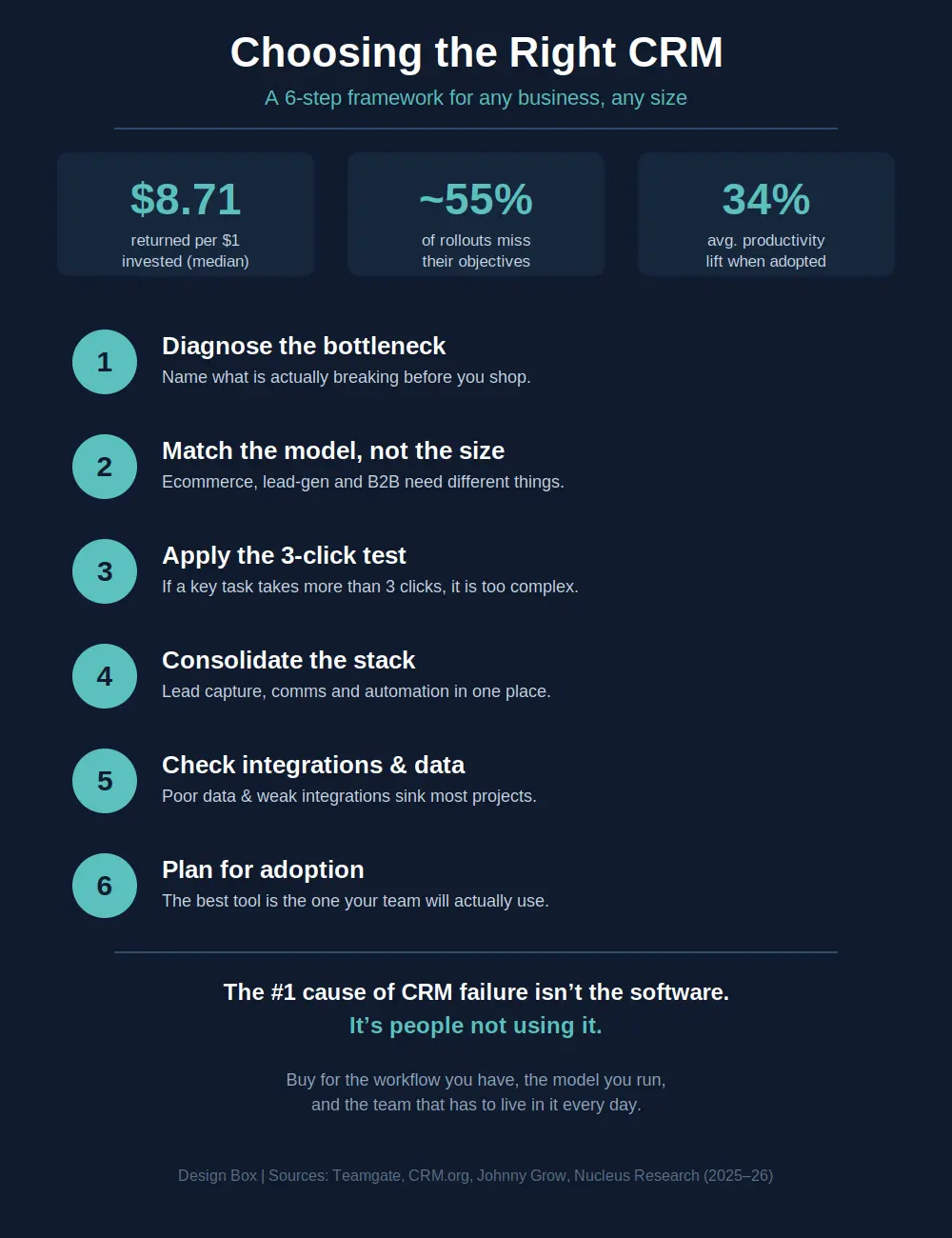
The 6-Step Framework at a Glance
There’s a popular line that small businesses should buy “simple” CRMs and big companies should buy “powerful” ones. I think that framing is wrong, the better question isn’t “how big are we?” It’s “what does our customer journey look like?” A two-person ecommerce brand can have a more complex automation need than a 200-person consultancy.
That said, there’s broad consensus on one thing: complexity for its own sake kills adoption. The most common reasons CRM projects fail are people-and-process issues e.g. low user adoption, weak change management, and poor data quality. So whatever your size, bias toward the system your team will genuinely use day to day.
The 3-Click Rule
Here’s a test I genuinely swear by, and it applies to a solo founder and an enterprise admin equally: if you can’t find a customer’s phone number, log a note, or send a message in three clicks, the software is too complex for everyday use. Powerful is fine. Fiddly is fatal.
Match the CRM to Your Business Model
Different business models stress a CRM in different ways. If you sell online, this maps closely to how we build ecommerce websites, where the CRM has to talk to your order data, not just your contacts. For service businesses, the same logic drives our lead-generating websites, which feed enquiries straight into a follow-up system. Use this as a starting map – the priorities in the right-hand columns are what I’d shortlist against, rather than a generic feature checklist:
| Business model | Primary goal | Features that matter most | Watch out for |
|---|---|---|---|
| Ecommerce / DTC | Repeat purchases & retention | Store integration, abandoned-cart & post-purchase automation, segmentation, reviews | Tools built for B2B pipelines that ignore order data |
| Lead generation / service | Speed-to-lead & follow-up | Web forms, instant SMS/email response, pipeline stages, booking, review requests | Anything that lets a hot lead sit unactioned |
| B2B / complex sales | Managing long, multi-touch deals | Deal stages, multiple contacts per account, forecasting, activity reporting | Lightweight tools with no real reporting layer |
| Large / multi-team org | Visibility & governance at scale | Permissions, integrations/API, data quality controls, audit & analytics | Over-buying features no one is resourced to run |
Consolidate Your Tech Stack
A modern CRM shouldn’t just be a glorified address book; at its best it acts as the glue connecting your website, your inbox and your sales team. There’s good evidence for this: organisations that integrate their CRM with email, automation and other tools report meaningfully higher returns than those running it as a standalone island. That’s the whole point of consolidation: pulling jobs like standalone email marketing into one place instead of stitching tools together. Look for a platform that handles:
- Lead capture – forms and landing pages that feed straight into your pipeline.
- Communication – email, SMS and chat in one thread, so context never gets lost.
- Automation – moving a contact from enquiry to closed without you touching a button.
- Reporting – a dashboard that shows exactly how much revenue is sitting in your pipeline right now.
Reputation: Turning Customers into Advocates
For most local and service businesses, reviews are now a primary growth channel, and personalised, well-timed outreach measurably moves customer behaviour.
A capable CRM can trigger a review request by SMS or email the moment a job is marked complete, building a steady stream of social proof while the experience is still fresh. Done well, this feeds directly into your local SEO, since fresh Google reviews are one of the strongest local ranking signals there is.
This isn’t exclusive to small businesses either; enterprises use the same trigger logic across thousands of transactions.
What to Look For – Beyond the Price Tag
Price is the easiest thing to compare and the worst thing to decide on. When I’m evaluating, I weight these far higher:
- Workflow automation – the ability to “set and forget” follow-ups.
Visibility – a clear, real-time view of pipeline value and channel performance. - Integrations & data quality – clean data and solid connections to your other tools. Poor data quality is one of the most cited reasons CRM projects underperform.
- Scalability – a system that copes whether you have 10 leads or 10,000.
- Adoption support – onboarding, training and a mobile app. Remember, this is where most implementations live or die.
The honest bottom line: the “best” CRM on any review site may not be the best for you. Buy for the workflow you have, the model you run, and the team that has to live in it every day.
Where Nexus CRM Fits In
Full transparency – this next part is about our own platform, so read it as exactly that.
At Design Box we built Nexus CRM after watching too many businesses buy great tools they never adopted. It’s our attempt to solve the “complex software” problem rather than add to it, with a unified inbox, sales pipelines, lead capture, booking and email marketing under one subscription.
Whether Nexus is right for you depends on the same criteria I’ve laid out above, so apply them to us as critically as you would to anyone else. If a different platform fits your model better, that’s the one you should choose.
Choose a Partner, Not Just Software
The right CRM is simply the one that helps you scale and that your team will actually open every morning. If you’re tired of juggling apps and losing leads in your inbox, it’s worth taking the framework above and pressure-testing your shortlist against it.
If you’d rather start with the bigger picture, book a free assessment call and we’ll show you where a CRM fits into your wider setup.
Additional Sources
- Vantage Point, why CRM projects fail (adoption, change mgmt, data quality) – https://vantagepoint.io/blog/hs/why-70-of-crm-projects-fail-and-how-the-people-process-technology-framework-prevents-it
- DemandSage / CRM.org, CRM statistics 2026 (adoption & impact) – https://www.demandsage.com/crm-statistics/