
The honest answer is that it depends on your market, your margins, and what you’re trying to achieve. But that’s not a useful answer on its own. So here’s how I actually work it out, with real numbers and UK-specific context.
Quick Answer
Work backwards from what a customer is worth to you, not forwards from a number that feels comfortable.
Find your market’s average cost per click using Google Keyword Planner, divide your target acquisition cost by your expected conversion rate to get your required daily budget, then multiply by 30.4 to understand your monthly commitment.
As a rough baseline, most UK SMEs (small and medium-sized businesses) need a minimum of £500 to £1,000 per month to run a campaign that generates enough data to optimise effectively. Below that, the algorithm doesn’t have enough signal to work with.
For best results, look to set a budget that is 10x your average CPA. The reasoning for this is so you can get around 10 conversions per day, which is essential for providing Google with the data it needs to optimise effectively.
Why most budget advice gets it wrong
The most common advice I see for setting a Google Ads budget is “start with £10 a day and see what happens.” I understand why people say it. It feels safe, it’s easy to remember, and it gets people started.
The problem is that £10 a day, or roughly £304 a month, will not work in most markets. It won’t generate enough clicks to gather meaningful data. It won’t run the algorithm’s learning phase properly.
And it will almost certainly produce disappointing results that lead the business owner to conclude Google Ads doesn’t work, when the real issue was an underfunded campaign.
Budget setting should start with your business goals and your market’s economics, not with a round number that feels manageable. The two questions I ask every new client before we agree on a budget are: what does a customer cost you to acquire in other channels, and what is that customer worth over their lifetime? Everything flows from those two numbers.
Before you set a budget, know your numbers
There are three figures you need before any budget conversation makes sense.
Your conversion rate. This is the percentage of people who visit your website and take the action you want, whether that’s making a purchase, submitting an enquiry, or calling your number.
If you don’t know this, Google Analytics will tell you. If you’re not tracking it properly, fix that first. A campaign without accurate conversion tracking is guesswork, and we cover that in detail in our guide to running Google Ads on a small budget.
Your target cost per acquisition (CPA). This is the maximum you’re willing to pay to get a customer. For an e-commerce business with a £150 average order value and a 40% gross margin, your gross profit per order is £60.
Paying £50 to acquire that customer leaves you £10 gross, which is probably not viable once you factor in other costs. A more realistic target CPA might be £20 to £30.
For a business selling high-value services, a CPA of £150 might be entirely acceptable if the customer is worth £3,000.
Your average cost per click (CPC) in your market. I’ll cover how to find this in the next section, but you need this figure to build your budget calculation.
Once you have all three, you can run the numbers properly.
How to find your market’s average CPC
Google Keyword Planner is the most reliable free tool for this. It’s inside your Google Ads account under Tools. Type in the keywords your customers are actually searching, your location, and it will return estimated top-of-page bid ranges for each term.
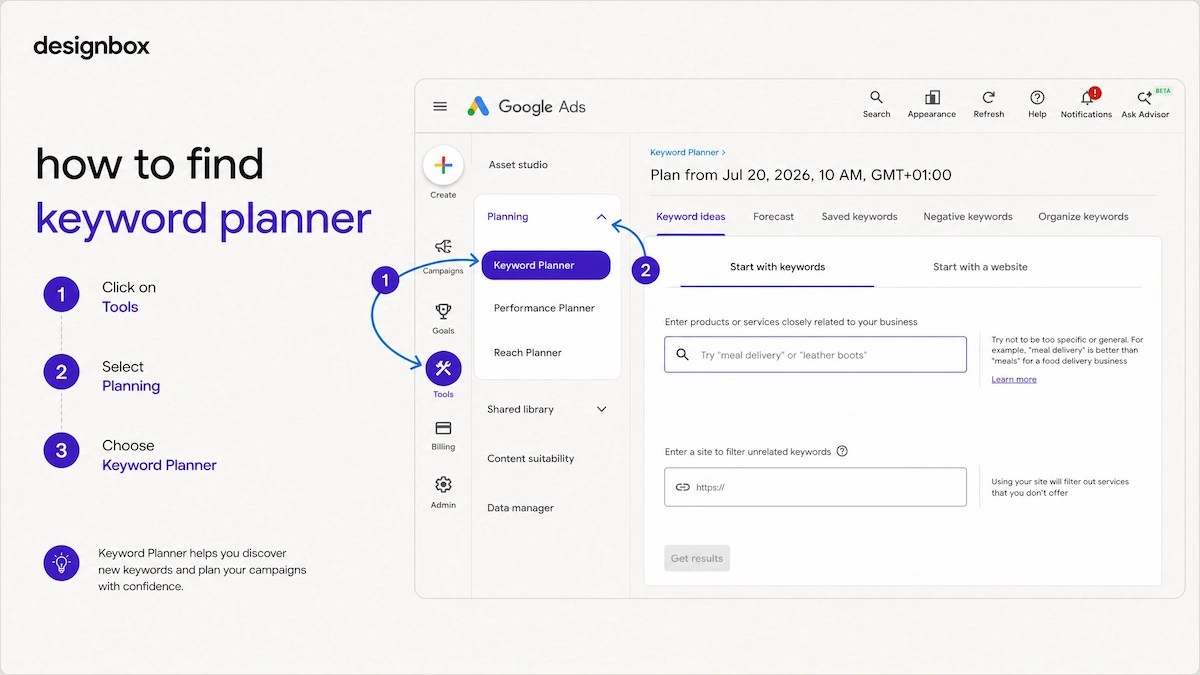
A few things to understand about these numbers. The low range and high range represent the bottom and top of what advertisers are paying for that keyword.
Your actual CPC will depend on your Quality Score, which Google assigns based on how relevant your ad and landing page are to the search. A well-structured account with strong ad copy can pay 15 to 25% less per click than a poorly managed one targeting identical keywords.
According to Whito’s 2026 UK PPC research, the average Google Ads CPC across all UK industries in 2026 is £1.95 on Search. But that average hides enormous variation.
Here’s a practical guide to what different sectors are paying:
- Legal services pay £5.00 to £12.00 or more per click
- Local trades pay £1.50 to £3.00
- E-commerce sits at £1.50 to £4.00.
Geography adds another layer. London consistently sees CPCs 15 to 30% higher than equivalent keywords in northern England, Scotland, or Wales. A solicitor targeting “conveyancing solicitor” in central London could pay £12 per click, whilst the same keyword in Leeds might cost £7.
The practical implication is this: do not set a budget until you have looked up your actual keywords in Keyword Planner for your actual location. The difference between assuming you’ll pay £1 per click and discovering you’ll pay £4 per click completely changes what a viable budget looks like.
The reverse-engineering method: How to calculate your budget
This is the approach I use with every new client and it’s more reliable than any rule of thumb.
Step 1: Set your monthly sales or leads target. Let’s say you want 10 new customers per month from Google Ads.
Step 2: Identify your target CPA. Based on your margins and what a customer is worth, you’ve decided you can afford to pay £40 to acquire each customer, for example.
Step 3: Calculate your required monthly budget. 10 customers x £40 CPA = £400 required monthly budget.
Step 4: Sense-check it against your conversion rate. If your website converts 2% of visitors into customers, you need 500 visitors to get 10 customers.
At an average CPC of £1.50, that’s 500 x £1.50 = £750. So your budget needs to be at least £750 per month, not £400, because the £40 target CPA assumes a conversion rate you haven’t yet achieved on paid traffic.
This is where most businesses underestimate their budget requirement. They calculate based on a target CPA that assumes their current organic or referral conversion rate, which is almost always higher than what paid traffic converts at, particularly for a new campaign in its learning phase.
The Google Ads budget formula in plain English:
Required monthly budget = (Target monthly customers ÷ Conversion rate) x Average CPC
Or working backwards from CPA:
Required monthly budget = Target monthly customers x Target CPA
Use both calculations and take the higher figure. That’s your realistic starting budget.

What the 30.4 rule means (and what changed in June 2026)
When you set a daily budget in Google Ads, you are not setting a hard daily limit. Google can spend up to twice your daily budget on high-traffic days, balancing it out on quieter days. Your monthly spending limit is 30.4 times your average daily budget.
So a £50 daily budget means:
- Google can spend up to £100 on a single busy day
- Your maximum monthly spend is £50 x 30.4 = £1,520
This is important to understand before you set anything up. Many businesses are surprised when they see days with higher spend than expected, but as long as the monthly total stays within 30.4 times the daily budget, Google is operating within its rules.
What changed in June 2026:
Google announced a change to budget pacing that took effect on 1 June 2026. Before this change, if your campaign used ad scheduling (for example, running ads on weekdays only), Google paced your spend based on the number of days your ads actually ran.
After June 2026, Google paces toward the full monthly limit of 30.4 times your daily budget, regardless of how many days your schedule allows.
The practical implication: if your campaign runs weekdays only (roughly 22 days per month) and your daily budget is £100, your previous monthly spend was approximately £2,200. Under the new rules, your maximum monthly exposure is £100 x 30.4 = £3,040, a 38% increase with no change to your settings.
If you use ad scheduling and haven’t reviewed your budgets since June 2026, check them now. The formula to maintain your previous monthly spend is:
New daily budget = (Old daily budget x active days per month) ÷ 30.4
So £100 x 22 days ÷ 30.4 = £72 new daily budget to maintain roughly the same monthly spend.
Realistic starting budgets by business type
These are the minimum monthly ad spends I’d recommend to run a campaign with enough data to make meaningful decisions. Below these levels, the learning phase takes too long and the results are too unreliable to draw conclusions from.
Local service businesses (tradespeople, clinics, solicitors): Minimum £500 to £800 per month. At £1.50 to £3 CPC for typical local service terms, this generates 150 to 500 clicks per month. Enough to start seeing conversion patterns, not enough for aggressive growth. For businesses working within this budget range, our guide to common mistakes in paid advertising is worth reading before you launch.
E-commerce businesses: Minimum £1,000 to £2,000 per month. E-commerce CPCs are typically £1.50 to £4, and you’re often running Search and Shopping campaigns simultaneously. Below £1,000 per month, it’s difficult to generate enough purchase data for Smart Bidding to optimise properly.
Smart Bidding needs at least 30 conversions per month at the campaign level to work effectively. Below that threshold, the algorithm doesn’t have enough signal to make accurate predictions and is essentially guessing. I cover this in more detail in our guide to AI tools and Google Ads.
B2B professional services: Minimum £1,000 to £1,500 per month. B2B CPCs vary widely but typically sit at £2 to £5 for competitive service terms. Lead volumes are lower than e-commerce, so you need enough budget to generate at least 5 to 10 leads per month to start seeing patterns.
Competitive national markets (insurance, legal, finance): £3,000 per month minimum, often significantly more. CPCs of £5 to £12 mean even a modest click volume requires serious investment.
None of these are figures I’d promise results at. They are the minimum thresholds below which I’d tell a business Google Ads probably isn’t the right channel for them right now, or they need to focus on a tightly targeted niche rather than a broad campaign.

How to structure your budget across campaigns
Once you know your total monthly budget, the next question is how to distribute it. A few principles I apply consistently.
Start with one campaign, not five. The most common structural mistake I see is spreading a limited budget across too many campaigns simultaneously. Four campaigns at £250 per month each will all underperform.
One campaign at £1,000 per month has a fighting chance. Consolidate first, expand once you have data.
For e-commerce, Search and Shopping need separate budget thinking. Shopping campaigns (and Performance Max for e-commerce) typically deliver better return on ad spend (ROAS) than Search for product-focused terms.
This is because the ad shows the product, the price, and the image before the click. If you’re running both, I’d typically weigh more budget toward Shopping initially and use Search for brand terms and high-intent queries Shopping doesn’t capture. Our guide to optimising Google Shopping campaigns covers the feed and structure side of this in more detail.
Don’t split campaigns by match type or device. This was the right approach five years ago. With Smart Bidding handling bid adjustments automatically in 2026, creating separate campaigns for mobile vs desktop or broad vs exact match is unnecessary complexity that dilutes your data and makes the algorithm’s job harder.
Keep budget in campaigns that are converting. Sounds obvious. In practice, I often see budgets distributed equally across campaigns regardless of performance, because it feels fair. It isn’t fair to your results.
If one campaign is generating leads at £25 CPA and another at £90 CPA, the first one deserves more budget, not an equal share.
The signals that tell you your budget needs adjusting
Once your campaign is live, these are the metrics I check to understand whether the budget is set correctly.
Search impression share (budget). This is the percentage of times your ads didn’t show because your budget ran out. If this figure is above 10 to 15%, your budget is restricting your reach. Google will flag campaigns as “limited by budget” in the interface. When I see this, I look at whether the CPA justifies increasing spend, or whether the campaign needs to be tightened first.
CPA trending upward. If your cost per acquisition is increasing month on month without a corresponding increase in competition, it often means the algorithm is running out of easy wins and reaching for harder conversions. This can be a signal to either increase budget to give it more volume to work with, or to tighten targeting to focus on higher-converting segments.
Conversion volume below 30 per month. If you’re consistently generating fewer than 30 conversions per month, your budget is almost certainly part of the problem. Increasing spend to generate more volume is often the most direct fix.
ROAS declining despite stable spending. If your return on ad spend is falling but your budget hasn’t changed, look at whether click quality has declined (check search terms for irrelevant traffic) or whether your landing page or product pricing has changed. Budget adjustment alone won’t fix a conversion rate problem.
Spend pacing is inconsistent. If campaigns regularly underspend in the first half of the month and then overspend toward the end, or vice versa, it usually means the daily budget is set incorrectly relative to actual search volume patterns in your market. Reviewing the budget pacing report in Google Ads will show you the day-by-day spend pattern.
Common budgeting mistakes I see in Google Ads accounts
Setting the budget before checking conversion tracking. Every budget decision I make is based on conversion data. If that data is wrong, every budget decision is wrong.
I’ve audited accounts where campaigns were spending thousands of pounds a month optimising toward duplicate conversion events, test transactions, or page views that were misconfigured as conversions. Fix your tracking before you set your budget.
Treating the daily budget as a monthly commitment divided by 30. It isn’t. As explained above, your real monthly commitment is the daily budget multiplied by 30.4, and Google can spend up to double the daily figure on busy days. Many businesses discover this the hard way on their first month’s bill.
Cutting budget when performance dips. When a campaign has a bad week, the instinct is to reduce spend. In most cases, this makes things worse. Cutting budget forces the algorithm back into or deeper into the learning phase, restricts the data it has to work with, and reduces the chance of recovery.
Unless something has fundamentally changed (a new competitor, a landing page issue, a tracking problem), hold the budget steady and investigate the cause before adjusting spend.
Starting with too many keywords and too little budget. A campaign targeting 200 keywords on a £500 per month budget is spreading itself impossibly thin. Each keyword gets perhaps two or three clicks per month. Nothing generates enough data to optimise. Start with 10 to 20 tightly relevant keywords and expand as performance and budget allow.
Not accounting for management fees in the total budget. Your Google Ads budget is your ad spend. It doesn’t include the cost of someone managing the account. A common mistake is allocating the total marketing budget to ad spend and then being surprised by the management fee on top. A realistic picture of total paid search investment includes both.
How designbox approaches budget planning for clients
When a business comes to us asking about Google Ads, the first conversation is never about ad creative or keyword strategy. It’s about the numbers above: what does a customer cost to acquire, what are they worth, and what does the competitive landscape look like for your keywords.
From that conversation, we build a budget recommendation that starts from commercial reality rather than from what feels comfortable. Sometimes the honest answer is that a business isn’t in a position to fund Google Ads effectively right now, and we’ll say so.
More often, we find that businesses have been underfunding campaigns and wondering why they’re not working, when a properly structured campaign at an appropriate budget level would change the picture completely.
If you’d like us to look at your market, estimate realistic CPCs for your keywords, and give you an honest view of what a viable Google Ads budget looks like for your business, we’re happy to do that.
FAQs
How much should I spend on Google Ads per month in the UK?
It depends on your industry, location, and goals, but as a practical minimum, most UK businesses need £500 to £1,000 per month to run a campaign that generates enough data to optimise. E-commerce businesses typically need £1,000 to £2,000 as a starting point.
Businesses in competitive sectors like legal or financial services often need £3,000 or more to appear consistently. Below these thresholds, campaigns tend to underperform not because the channel doesn’t work, but because there isn’t enough budget for the algorithm to learn effectively.
What is a good daily budget for Google Ads?
Divide your target monthly spend by 30.4 to get your daily budget. A £1,000 monthly budget equals a £32.89 daily budget. Remember that Google can spend up to twice this on a single day, so a £33 daily budget means you could see days with up to £66 spend, balanced out by quieter days. The monthly total won’t exceed £1,000.
Is £500 a month enough for Google Ads?
For local service businesses in lower-competition markets, £500 a month can work if the campaign is tightly structured around a small number of high-intent keywords.
For e-commerce or any business in a competitive national market, £500 a month is unlikely to generate enough volume to see meaningful results. The question isn’t just whether you can afford £500, but whether £500 is enough to compete in your specific market.
How do I know if my Google Ads budget is too low?
Google will flag campaigns as “limited by budget” in the interface when your ads aren’t showing in every eligible auction. You can also check Search Impression Share (budget) in your campaign reporting.
If this figure is above 10 to 15%, your budget is restricting your reach. Consistently generating fewer than 30 conversions per month is another strong signal that budget is a limiting factor.
Should I increase my budget if my campaigns are performing well?
Yes, but gradually. When I see a campaign hitting its CPA targets consistently, I’ll recommend increasing the daily budget by 15 to 20% at a time rather than doubling it overnight.
Large budget increases can trigger a new learning phase and temporarily destabilise performance. Incremental increases give the algorithm time to find additional volume without disrupting what’s already working.
How does Google Ads budgeting work for e-commerce specifically?
E-commerce budgeting is more complex than single-campaign service businesses because you’re typically running Search and Shopping campaigns simultaneously, targeting both branded and non-branded terms, and often dealing with seasonal volume fluctuations.
I’d recommend reading our guides to running Google Ads on a budget and optimising Google Shopping campaigns alongside this one, as the structural decisions sit alongside the budget decisions.
For a fuller picture of how Google Ads fits into your wider e-commerce marketing investment, our comparison of Google Ads vs Meta Ads for UK businesses covers the channel-level decisions.
What happened to Google Ads budgets in June 2026?
Google changed how budget pacing works for campaigns using ad scheduling. Previously, if your campaign ran on weekdays only, Google paced your spend across those active days.
From 1 June 2026, Google paces toward the full monthly limit of 30.4 times your daily budget, regardless of how many days your schedule allows.
If you use ad scheduling and haven’t reviewed your budgets since this change, you may be spending significantly more than intended each month. Recalculate using: new daily budget = (current daily budget x active days per month) ÷ 30.4.